
Close Menu
Be Real InfoBe Real Info

    Subscribe to Updates

    Get the latest creative news from FooBar about art, design and business.

    What's Hot

    How frequently to replace parts of CPAP machine?

    9 August 2026

    When Should You Choose Water Excavation Brisbane Over Mechanical Digging?

    6 August 2026

    Factors to Consider Before Choosing a Residency by Investment Program

    6 August 2026
    Facebook X (Twitter) Instagram
    Facebook X (Twitter) Instagram
    Be Real InfoBe Real Info
    Button
    • Home
    • News
    • Blog

      Behind the Line: How Bookmakers and Markets Set Odds

      12 July 2026

      Should You Buy All Your Solar Equipment from One Manufacturer?

      8 July 2026

      Beyond the Bank Account: How E-Money and Prepaid Products Widen Financial Access

      3 July 2026

      Why the Casing Is the Most Underrated Decision in Sausage Making

      31 May 2026

      Choosing the Right Approach for Bulk Excavation Brisbane

      30 April 2026
    • Business
    • Fashion & Lifestyle
    • Health
    • Technology
    • Travel
    Be Real InfoBe Real Info
    You are at:Home»Blog»Can I block or unblock someone on bereal? How? [Guide]
    Blog

    Can I block or unblock someone on bereal? How? [Guide]

    WashimBy Washim25 September 2023No Comments3 Mins Read
    Facebook Twitter Pinterest LinkedIn Tumblr Email
    Can I block or unblock someone on bereal
    Share
    Facebook Twitter Pinterest WhatsApp Email

    Bothered by someone on Bereal and want to get rid of them? Well, we know exactly how to guide you through. Blocking is an active assertion of your privacy. It gives you the option to choose your viewers.

    There could be someone who would take screenshots of your Bereals and post them somewhere else or could be mean to you for being “unfiltered and real” or there could be some other reasons to make you feel opposed and low.

    Bereal never stands by such activities and hence provides the Bereal users to choose their audience and how they can interact, by providing a “blocking feature”.

    Table of Contents

    Toggle
    • Can you block someone on Bereal, Without them knowing?
    • How can you block someone on Bereal?
    • How can you unblock someone on Bereal?
    • What does blocking someone on bereal do
    • Can someone block you on Bereal?
    • Conclusion

    Can you block someone on Bereal, Without them knowing?

    The answer is YES! You can block anyone you want, with the blocking feature introduced by bereal. The best thing about it, is that the one you block will never be notified of them being blocked.

    Blocking could be hard at times. But sometimes we need to maintain our self respect and dignity from those who challenge it. We need to move on and give us some space to heal.

    Hence, we need to take a strong and constructive step as this one. It is important keep a safe distance and it’s absolutely necessary to set boundaries. Blocking is not a sign of isolation but a healthy choice.

    How can you block someone on Bereal?
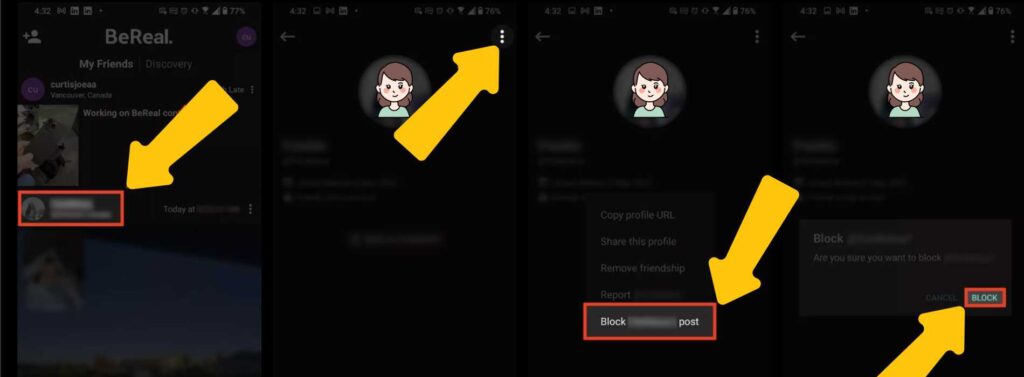
    block on bereal

    Blocking a user is uncomplicated and easy with the bereal app. Follow the steps

    • Step 1:

    Go to the profile of the user that you intend to block >

    • Step 2:

    Tap the three-dot menu in the top right corner >

    • Step 3:

    choose the option to block

    And you are done!

    How can you unblock someone on Bereal?

    unblock on bereal

    When a user blocks someone they directly unfriend them too. Therefore, if you want to interact with them again first you need to unblock them and then send friends invitation, get back on terms only when they accept it. Follow the steps

    • Step 1

    Go to their profile. Tap Three dot Blocked profiles.

    • Step 2

    Fine the user you wish to unblock from the list of blocked profiles,then tap the x next to their name .

    • Step 3

    Then unblock the user.

    What does blocking someone on bereal do

    Now that you have blocked the intended user, you must be wondering what happens when you block someone on bereal. Let’s understand all the further features that unlock with blocking.

    When you block someone

    1. They cannot view or react to your bereal posts.
    2. They won’t be able to send you friend requests/ Invitations.
    3. They cannot See the reactions you make on your friends posts.
    4. Cannot view the information you put in your profile.

    Can someone block you on Bereal?

    Yes. With bereal’s blocking feature any user is able to choose their audience by blocking those they don’t want to interact with. Once someone blocks you, you will not be able to see their reactions on others posts, visit their page and see the information or see their bereals.

    Why is the – Bonus BeReal not in Memories?

    Conclusion

    Blocking is a healthy choice to make inorder to set boundaries, protect our privacy and heal ourselves for the better. It’s a necessary step and must be appreciated as it takes courage.

    With bereal’s blocking feature a user is able to choose their audience and assert themselves. This article lets the readers know if they can block any user without them knowing and with steps.

    Washim

    Related Posts

    Behind the Line: How Bookmakers and Markets Set Odds

    By Olivia12 July 2026

    Should You Buy All Your Solar Equipment from One Manufacturer?

    By Olivia8 July 2026

    Beyond the Bank Account: How E-Money and Prepaid Products Widen Financial Access

    By Olivia3 July 2026

    Why the Casing Is the Most Underrated Decision in Sausage Making

    By Olivia31 May 2026
    Add A Comment
    Leave A Reply Cancel Reply

    You must be logged in to post a comment.

    Latest Posts

    How frequently to replace parts of CPAP machine?

    By Olivia9 August 2026

    The fact that a CPAP machine will be used every night will imply that certain…

    When Should You Choose Water Excavation Brisbane Over Mechanical Digging?

    6 August 2026

    Factors to Consider Before Choosing a Residency by Investment Program

    6 August 2026

    Using Color Effectively in Your Commercial Interior Design

    5 August 2026

    Behind the Line: How Bookmakers and Markets Set Odds

    12 July 2026
    Categories
    • All
    • Bio
    • Blog
    • Business
    • Education
    • Fashion & Lifestyle
    • Health
    • Home
    • News
    • Others
    • Technology
    • Tips
    • Travel
    Don't Miss

    How Clinics Use Software to Improve Patient Communication

    By Olivia8 July 2026

    Should You Buy All Your Solar Equipment from One Manufacturer?

    By Olivia8 July 2026

    Beyond the Bank Account: How E-Money and Prepaid Products Widen Financial Access

    By Olivia3 July 2026

    Everything You Need to Know About Taps, Showers & Sanitary Ware

    By Olivia1 July 2026
    Stay In Touch
    • Facebook
    • Twitter
    • Instagram
    • LinkedIn
    • WhatsApp
    • Pinterest
    Latest Posts

    How Clinics Use Software to Improve Patient Communication

    8 July 2026

    Should You Buy All Your Solar Equipment from One Manufacturer?

    8 July 2026

    Beyond the Bank Account: How E-Money and Prepaid Products Widen Financial Access

    3 July 2026
    About Us
    About Us

    Be Real Info provides all the necessary information. We always try our best to give you the latest information. If you have any doubt or queries regarding websites or any form of information related, please feel free to mail us.
    |
    Email: [email protected]
    |
    To write an sponsored post/guest post or to want your start up to get listed on our website, email us.
    |
    Thank you for understanding.

    Facebook Instagram LinkedIn WhatsApp
    Top Posts

    How frequently to replace parts of CPAP machine?

    9 August 2026

    When Should You Choose Water Excavation Brisbane Over Mechanical Digging?

    6 August 2026

    Factors to Consider Before Choosing a Residency by Investment Program

    6 August 2026
    Facebook X (Twitter) Instagram Pinterest TikTok
    • Home
    • Privacy Policy
    • Contact us
    © 2026 Be Real Info - All Rights Reserved

    Type above and press Enter to search. Press Esc to cancel.